Everything you need to train world-class photographers.
From AI-powered quality detection to real-time analytics and gamification, AI Photo Trainer gives you complete control over your photography training program.
Core Features
Powerful tools for photography training
Every feature is designed to help you train photographers faster, improve quality, and build stronger teams.
Performance Tracking
Monitor speed, accuracy, and quality metrics in real-time. Track individual photographer progress and identify areas for improvement with comprehensive analytics.
- Real-time performance metrics
- Speed and accuracy tracking
- Progress visualization
Badge System
Motivate your team with achievement badges and gamification. Recognize excellence and drive engagement with customizable badge programs.
- Achievement badges
- Leaderboards
- Custom badge creation
Analytics Dashboard
Comprehensive analytics to understand team performance. Make data-driven decisions with detailed reports and insights.
- Team performance reports
- CSV export
- Trend analysis
AI Quality Control
Automated detection of glare, pose issues, and exposure problems. Catch quality issues before they reach your customers.
- Glare detection
- Pose analysis
- Exposure evaluation
Team Management
Manage photographers and track individual performance. Build stronger teams with comprehensive management tools.
- Photographer profiles
- Performance comparisons
- Bulk management tools
Desktop Application
Offline-capable desktop application with seamless sync. Work anywhere, even without internet connectivity.
- Offline mode
- Automatic sync
- Windows 10+
Workflow Modes
Optimized for every photography scenario
Switch between three specialized modes designed for different shooting environments, from high-volume sports photography to detailed group portraits.
Sports Mode
Built for speed and high-volume workflows. Process 100+ photos per session with simplified quality checks.
~120 photos/hour vs 20-30 standard
- Ultra-fast <50ms processing
- Exposure & blur detection only
- 100+ photos per session
- No AI review delay
Spring Portrait Mode
Perfect for class photos and family portraits. Analyze groups of 2-15+ people with formation quality scoring.
Prevents costly reshoots
- Multi-subject detection (2-15+ people)
- Formation quality analysis
- Full-body pose evaluation
- Background exposure detection
Traditional Mode
Comprehensive AI analysis for individual headshots. Detailed quality metrics and pose evaluation.
Complete quality evaluation
- Individual headshot focus
- Detailed quality metrics
- Comprehensive pose analysis
- Professional standards
Adaptive Training
Feedback that grows with your photographers
Three feedback modes that automatically adapt as photographers gain experience, from detailed explanations for beginners to streamlined metrics for veterans.
Trainee Mode
Full descriptions with educational explanations for every quality issue.
Head Angle Issue
The subject's head is tilted 12° to the left. For professional yearbook portraits, we want the head within 3-10° for a natural, balanced look.
- 50% faster training time
- Step-by-step guidance
- Educational explanations
Intermediate Mode
Concise feedback with icons and brief text for efficient workflow.
Head tilt: 12° left
- 30-40% efficiency improvement
- Quick scanning
- Focused feedback only
Advanced Mode
Pure data with icons and penalty values only. Maximum efficiency for experienced professionals.
-0.8
- Zero information overload
- Maximum speed
- Veteran preferred
Photographers naturally progress through feedback levels as they build experience and confidence.
Dashboard & Analytics
Powerful insights at your fingertips
Two comprehensive dashboards provide complete visibility into training progress, performance metrics, and team analytics.
Admin Dashboard
Complete oversight for managers and administrators
Executive Summary
- Total active photographers
- Sessions completed (today/week/month)
- Average quality scores across team
- Top performers leaderboard
Visual Analytics
- Training activity over time
- Photographer performance comparison
- Issue detection breakdown
- Training activity heatmaps
Team Analytics
- Performance distribution analysis
- Department/location comparisons
- Training effectiveness metrics
- ROI calculations
Issue Detection Reports
Track glare, pose issues, smile problems, eyes closed detections, and more. View issue trends over time and identify the most common problems by photographer.
Export & Reporting
Export all reports to CSV, filter by date range, and build custom reports. Schedule automated email reports (Pro Plus & Unlimited plans).
Photographer Portal
Personal dashboard for individual performance tracking
Personal Statistics
- Total sessions and photos rated
- Average quality scores
- Photos per hour (speed metric)
- Badge count and total points
Performance Trends
- Quality score over time (line charts)
- Photos per hour improvement
- Issue detection accuracy trends
- Session frequency heatmap
Badge Showcase & Session History
View your complete badge collection with progress toward unearned badges. Access detailed session history with quality scores, issues detected, and badges earned per session. See your position on the leaderboard and track your personal bests and milestones.
Advanced Features
Flexible pose standards
Different photography types require different pose standards. Switch between profiles instantly with no restart required.
Traditional Portrait
Industry standard yearbook pose (3-10° head angle). High strictness for consistent, professional portraits.
Professional Headshot
Moderate angles (8-15° head). Balanced professional look with medium strictness.
Casual Portrait
Relaxed positioning (5-20° head). Low strictness for natural, relaxed photo sessions.
Artistic Portrait
Creative angles (15-35° head). Maximum creative freedom with low strictness.
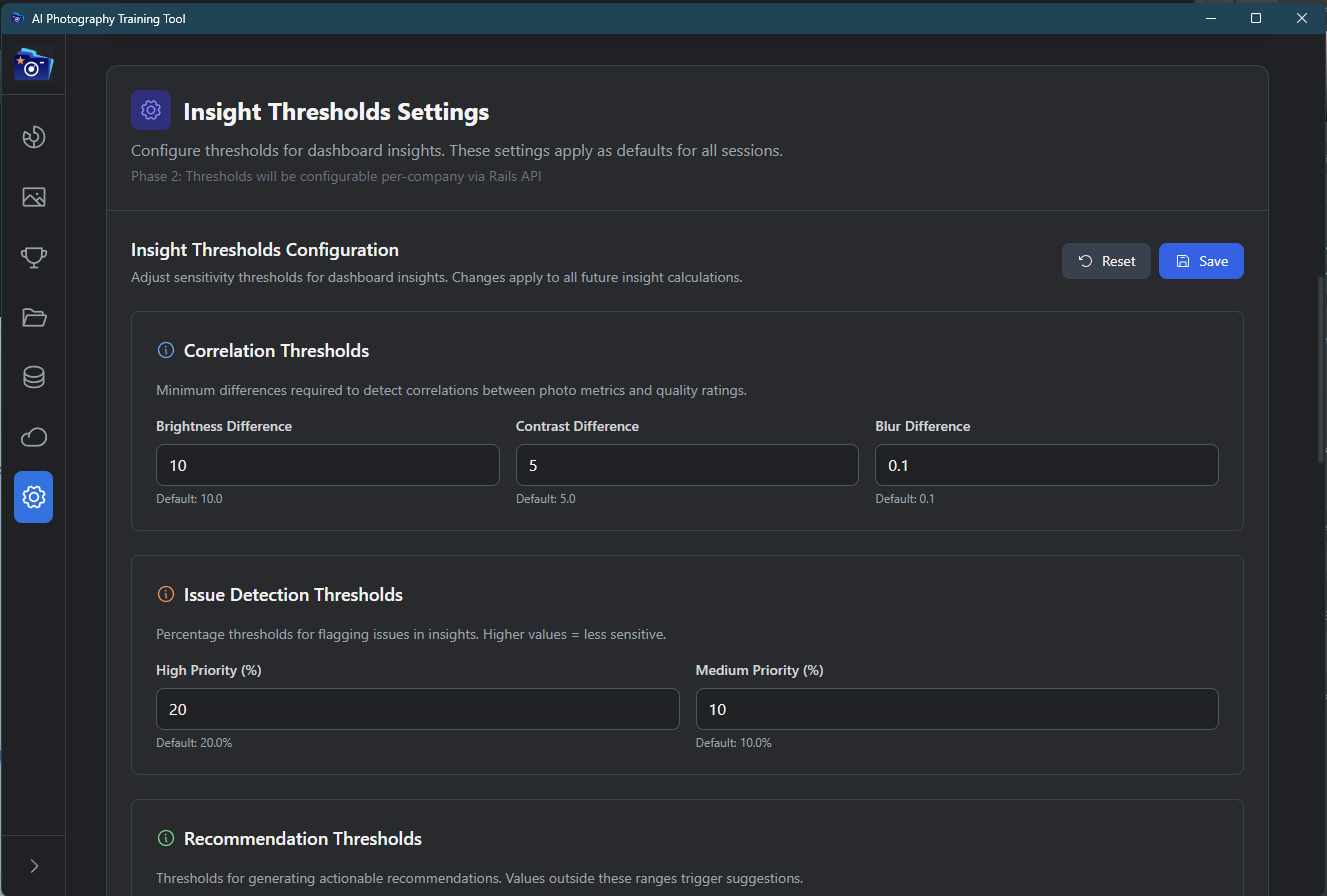
Customizable Thresholds
Every photography company has different quality standards. Customize angle ranges, strictness levels, and quality thresholds to match your exact requirements. All changes take effect immediately with no restart required.